
Pain point 1:Fragmented project cost data
Typical challenges today
Excel, ERP, finance systems, OA, email, Word
Leads to
- Data cannot be unified
- Delayed information updates
- Leadership cannot see project cost status in real time
SIWICLOUD SC AI_PRO
Manage cost planning, execution, control, and settlement across the project. CBS is the structure and the Cost Sheet is the single view, so cost can be planned, traced, analyzed, and controlled.
Cost lifecycle
The problem owners face
Typical challenges today
Excel, ERP, finance systems, OA, email, Word
Leads to
Many projects stop at basic design without detailed design, leaving no control budget and no view of total cost.
Questions
Traditional management
Month-end tally: How much has been spent?
Executive management needs
What will the project ultimately cost?
Required
During project execution
Design changes, site certifications, negotiations, and claims occur frequently:
“It happened, but it was not reflected in the cost forecast.”
Leads to
Project margins keep falling.
Enterprise groups
Dozens of projects running in parallel.
Headquarters needs to know
Personnel changes
Data silos.
What enterprises need
Turn proven practice into a standardized project cost control framework.
SIWICLOUD SC™ AI_PRO
SC AI_PRO is a lifecycle cost control platform for major engineering projects—digital management from estimates through contracts, budgets, changes, claims, payments, to final cost forecast.
Core value: Forecast final project cost dynamically from current cost performance.
Shift from after-the-fact accounting to forward-looking forecasts—from spotting cost variances to controlling cost risk early.
Intelligent calculation base
Intelligent compute foundation for project control—from manual processing to smart calculation
AI_PRO engineering-grade AI engine use cases
Private-domain large language model
Switch between multiple models
Data security
AI automatic CBS rollup
AI correlation fusion matrix
AI decisions
Excel intelligent conversion
AI data processing
AI assetization
Core capability
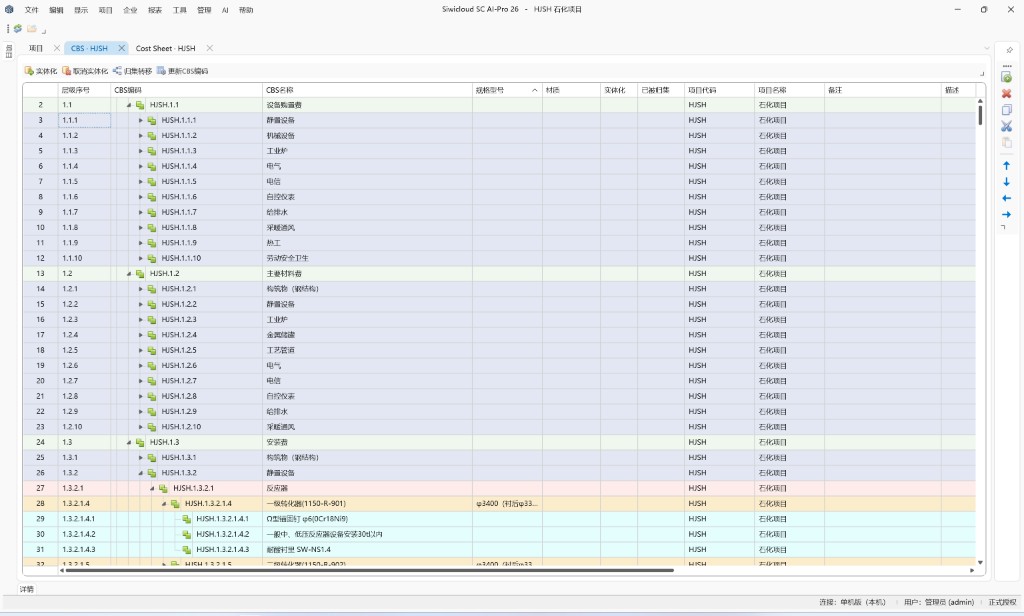
One CBS-based view of all project costs
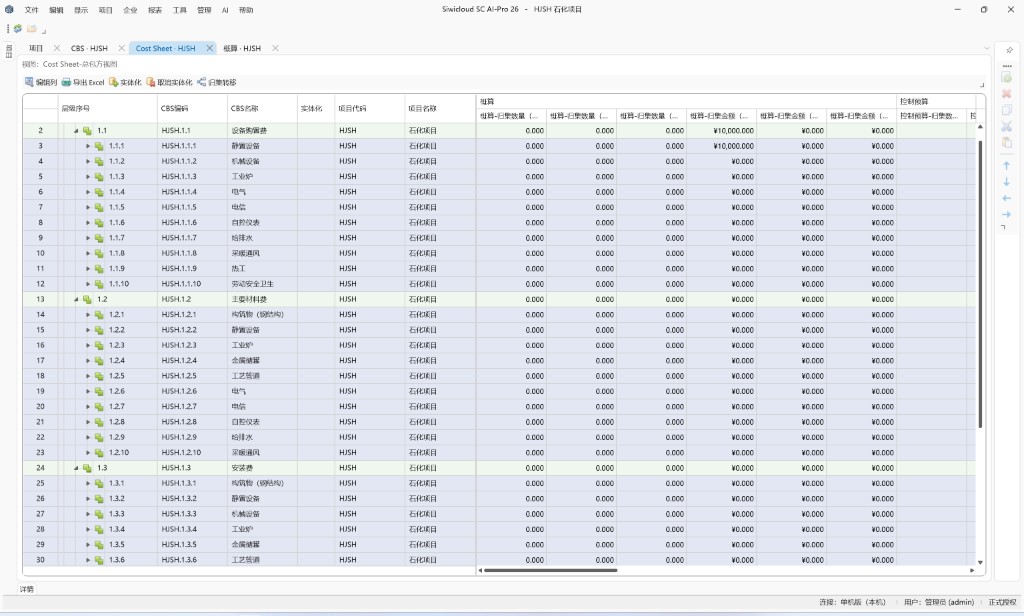
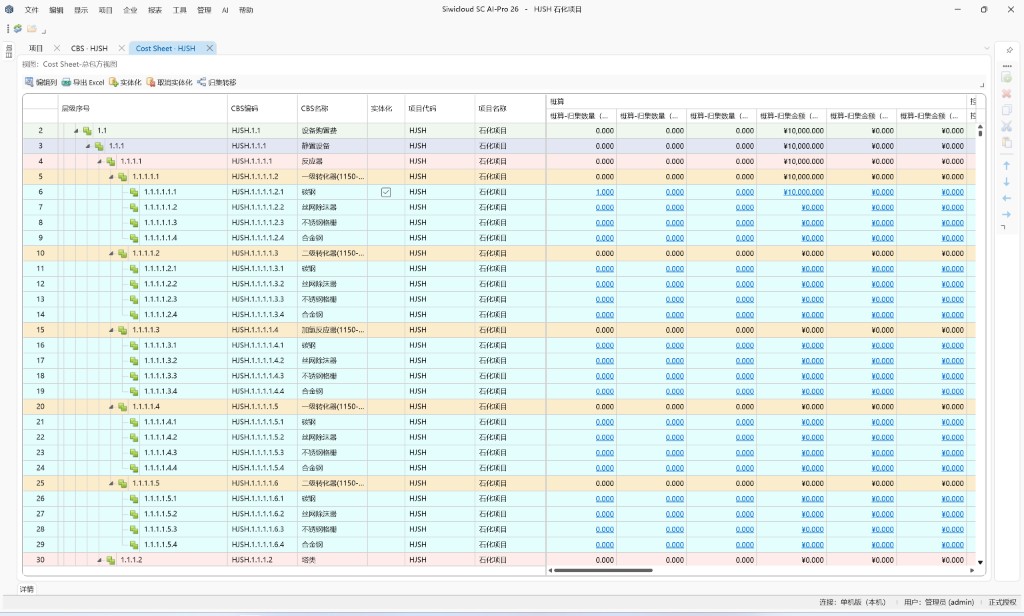
Cost Sheet is the cost hub of SC AI_PRO. Estimates, budgets, contracts, payments, changes, certifications, claims, and costs roll up to one master table by CBS node for structured view, comparison, and control.
Core product value
From investment targets through final settlement—cover every cost phase and build an end-to-end cost control chain.
One project, one cost framework, one data source—connect investment, contract, and cost silos.
Reduce manual classification, Excel wrangling, and tallying—smarter, faster cost data processing.
Analyze target, incurred, paid, and estimate-at-completion in real time to spot variances and risks early.
Core functions
01
Establish a unified project cost control framework
Use CBS to structure project costs and aggregate spending across phases and sources for end-to-end tracking.
02
View and roll up all project costs on a CBS basis
Using CBS as row structure, consolidate all project cost transactions on one master sheet. Managers can view targets, contracts, incurred amounts, payments, and forecast final costs by node for full lifecycle cost comparison.
03
Establish target cost baseline for the project
Cost targets by project phase for investment control and execution analysis.
04
End-to-end management of contract value and cost execution
Unified revenue and procurement contracts across the engineering contract lifecycle.
05
Control project cost changes dynamically
Changes, variations, and claims materially affect final cost. Manage both revenue and expenditure sides in one place.
06
Smarter, faster cost data processing
Identify cost name, amount, and category; intelligently assign to your CBS; support bulk processing in Excel.
07
Close the loop on final project cost
Final settlement, cost confirmation, cost analysis, and project data retention.
Product strengths
Investment, contracts, and cost no longer sit in separate systems. CBS gives one project, one cost language, and one source of data.
Live cost control
Give managers five answers at any time, and surface variance and risk early.
Target Cost
What is the target cost?
Incurred to date
How much has been incurred to date?
Paid
How much has been paid?
Estimated at completion
What is the estimate at completion?
Variance analysis
Where are the variances?
What a pilot delivers
Establish project CBS
Map WBS, contracts, budget, and actual cost to CBS for one consistent cost control language per project.
Establish a dynamic cost baseline
Establish target cost, budget, contract cost, and control baselines to support variance analysis.
Connect schedule, contracts, and cost
Link WBS → CBS → contract → budget → actual → schedule and cut manual Excel roll-ups.
Generate completion cost forecasts
From current execution, dynamically compute incurred cost + ETC → forecast at completion to spot potential overruns early.
Find out why costs are off track
Drill down from project → WBS → CBS → contract → cost detail to pinpoint sources of cost variance.
Codify project cost control methodology
After the pilot you gain more than software data—a CBS framework, control rules, data models, analytics, and processes to standardize rollout.
